

HOW TO SIGN UP FOR eSTATEMENTS
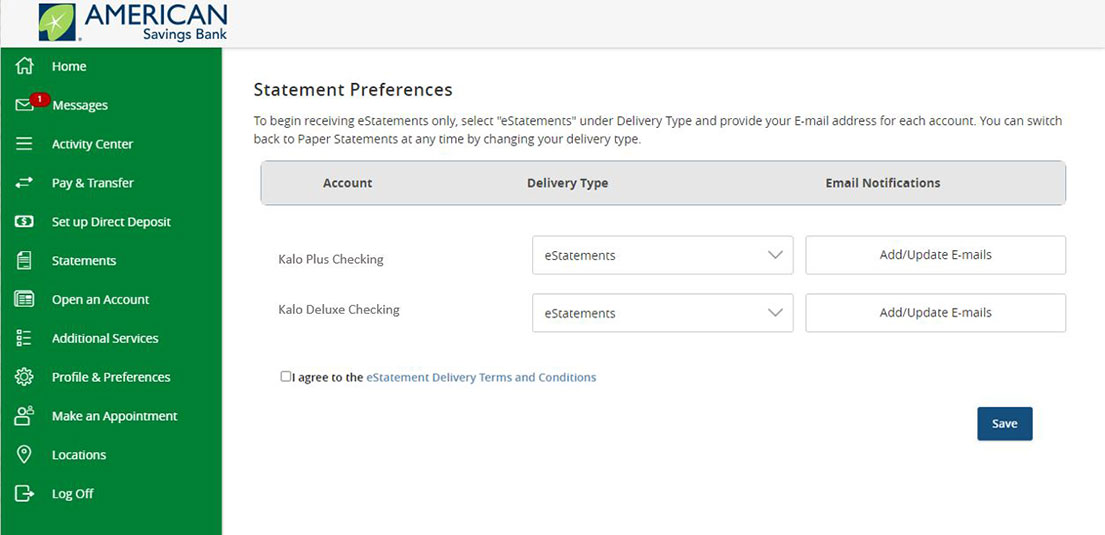
To sign up for eStatements for your accounts follow these steps after logging into Online Banking:
- From the Menu, click on 'Statements,' then 'Go Paperless.'
- For each account, select eStatements for the Delivery Type.
- Click on 'Add/Update E-mails' and enter your e-mail address and click Submit. Perform this step for each eStatement account. A notification will be sent to this e-mail when your eStatement is ready.
- Review the terms and conditions, then select the checkbox if you agree.
- Click Save.
Need Additional Help?
Online Banking eStatements Common Questions >
eStatement Features

SECURE
Reduce private information being mailed to your home and have peace of mind that your documents are safely stored online for up to 24 months.

CONVENIENT
We’ll send you an email when your statement is ready to view. You may view or print statements as needed and they are available for up to 24 months.

PROTECTED
To protect yourself and your information, go paperless to see your confidential information digitally.
At American Savings Bank (ASB), protecting our customers’ financial data is our top priority. If someone contacts you claiming to be from ASB and asks for account details or to transfer money, it may be fraud to gain access to your banking information or deposits. We encourage customers to regularly monitor their accounts and contact ASB’s Customer Banking Center at (808) 627-6900 or toll-free (800) 272-2566 to report suspicious activity.
1. eStatements not available for CDs, Overdraft Products and certain Business Loans and Lines of Credit.